Head-to-head · Bookkeeping
QuickBooks Online vs Xero for a solo bookkeeping practice
We ran an identical quarter of deliberately messy books through QuickBooks Online and Xero — same imports, same planted errors, same checklist. Here is what each caught, what each missed, and which one a solo practice should build on.
Some links below are affiliate links — if you subscribe through one, we earn a commission at no extra cost to you. It never changes a verdict; every tool runs the same test books. Full disclosure
Both tools kept the books accurately — and both waved an identical duplicated charge straight through, missed a refund’s meaning, and left every genuinely hard judgment to the human. The difference is how they fail: QuickBooks Online guesses confidently and is often wrong; Xero suggests nothing until you teach it, then copies you faithfully. After running the same messy quarter through both, our verdict for a solo bookkeeping practice choosing a default platform is Xero — it scored 25/32 on our checklist to QuickBooks’ 21/32, costs $30/month less at the comparable tier, gives every client file unlimited free users, and never fabricated a category in three months of transactions. QuickBooks earns the nod when a client arrives already living in it, or when its genuinely superior learned-suggestions engine and accountant-specific roles matter more to you than the price gap.
How we tested
We imported the same books into a fresh trial of each tool: a full quarter (April–June 2026) of a fictional three-person landscaping company — 162 bank and card transactions from identical CSV files, 18 customer invoices, and five deliberately planted traps: a duplicated charge, a refunded deposit, an uncategorizable vendor, a foreign-currency purchase, and a two-week hole in the bank feed. Every claim below comes from those trials, scored on the same 32-point checklist, with screenshots. The full methodology — and the dataset itself, if you want to re-run our test — is on the How we test page.
Pricing, verified
Prices checked August 10, 2026, at signup — not from marketing pages.
| QuickBooks Online | Xero | |
|---|---|---|
| Tier we tested | Essentials — $85/mo | Growing — $55/mo |
| Cheapest tier | Simple Start — $38/mo | Early — $25/mo (caps: 20 invoices, 5 bills/mo) |
| Current promo | 90% off for 3 months (ends 8/27) | 90% off for 6 months |
| Free trial | 30 days, hidden behind the promo funnel | 1 month, behind a "Get one month free" toggle |
| Users included | 3 (Essentials) + free accountant seats | Unlimited, all plans |
| Multi-currency | Included in Essentials | Established tier only ($90/mo) |
Numbers age; the pricing tracker carries the current, dated verification for every tool we test.
Two warnings from our signups that neither pricing page advertises. First, both funnels default to a discounted paid plan, not the trial — QuickBooks’ pre-selected option would have charged $8.50 on day one; the actual trials hide behind a toggle or a separate page. Second, both trials demanded a credit card and neither allows removing it afterward — the trial auto-converts to a paid subscription unless you actively cancel. A free trial with a card you can’t remove is a subscription with a fuse. Set a calendar reminder the day you sign up.
The bottom line first
| QuickBooks Online | Xero | |
|---|---|---|
| Import & setup (8) | 6 | 7 |
| The five traps (10) | 4 | 4 |
| Everyday work (8) | 6 | 8 |
| Reports & access (6) | 5 | 6 |
| Total (32) | 21 | 25 |
| Time: signup → reconciled quarter | ≈ 2 h 10 m | ≈ 1 h 52 m |
| Wrong category guesses (whole quarter) | ≈ 15 | 0 |
Getting the books in
QuickBooks’ importer fought us twice: it rejects ISO-formatted dates outright (the format most bank exports use), and it silently mangled every non-ASCII character in our descriptions with no warning. Xero auto-mapped every column on the first try and — the detail we came to appreciate — shows a live preview of exactly how your first transaction will land before you commit the import.
Invoice import went the other way around: QuickBooks took our generic CSV and created all 18 invoices with correct dates and terms on the first attempt. Xero demands its own template, and when a column doesn’t resolve it fails in the worst way — importing anyway, silently dropping the bad field, then refusing bulk approval with an error that never names what’s missing.
One import behavior deserves its own paragraph: QuickBooks rewrites your bank descriptions. “HOME DEPOT #4821” becoming “Home Depot” is helpful grooming. But our deliberately cryptic vendor “K PLM HOLDINGS 8842” became “L M Holdings” — the one string a bookkeeper would need to research, corrupted. Xero preserves every descriptor byte-for-byte.
Trap 1: the duplicated charge
The same $342.17 hardware-store charge, posted twice by the bank on the same day. Every import-screen and posting flow in both tools handled the twins without a flicker of suspicion.
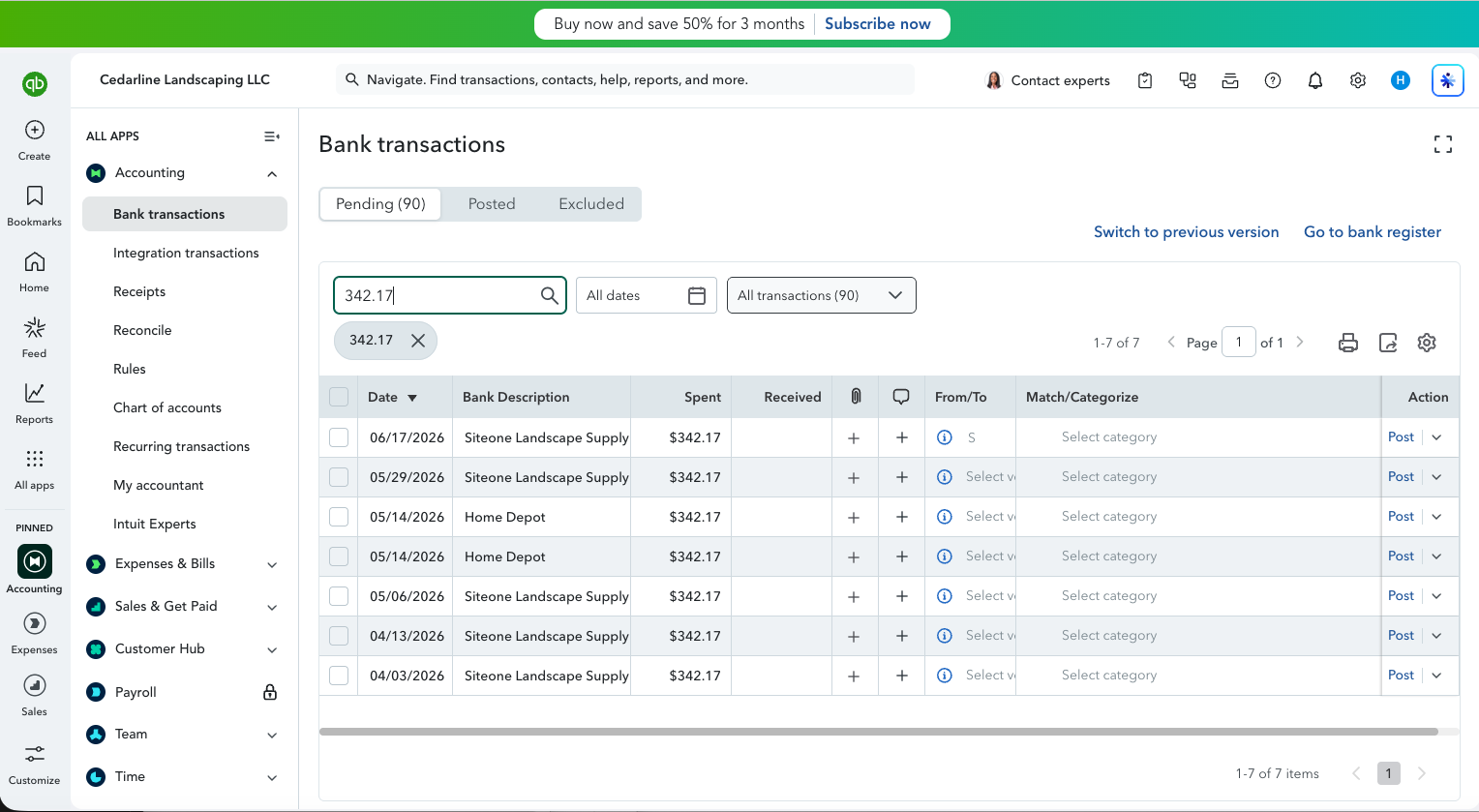

Neither market leader detects an identical same-day duplicate — the most mechanical error a bank feed can contain. If you don’t catch it, your client’s expenses are overstated by exactly $342.17 and the card never reconciles. Score: 0/2 for both. The human is the duplicate detection.
Trap 2: the refunded deposit
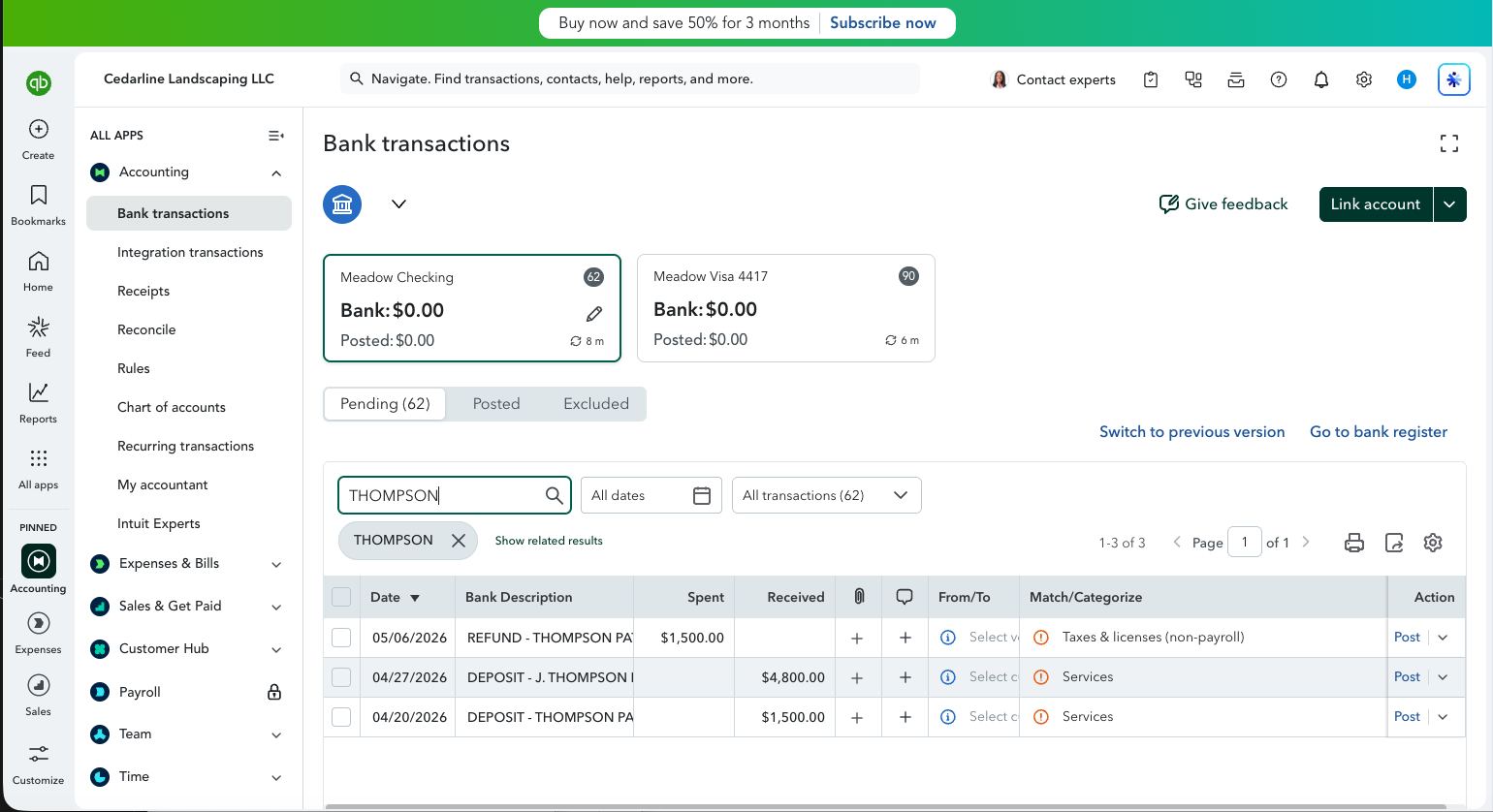
A customer put down $1,500 on a patio project in April; the job fell through and the deposit went back in May. Handled wrong, the books show $1,500 of income that was never earned.
QuickBooks handled it worse than wrong — it suggested booking the refund as “Taxes & licenses”, which would have created phantom income and a phantom tax expense with two friendly clicks:
Xero suggested nothing at all — no help, but also no trap:
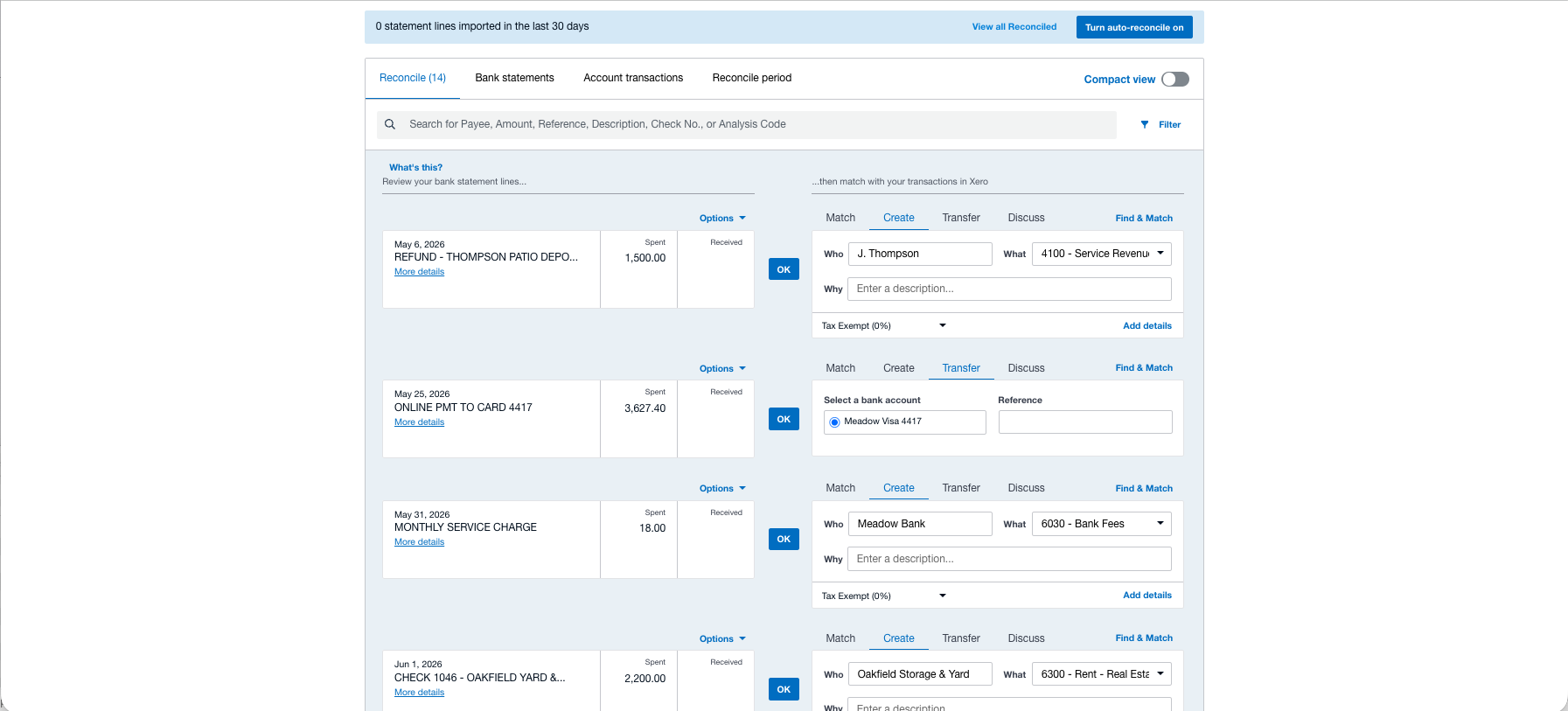
Neither tool connected the refund to its original deposit, even with matching amounts and “REFUND” in the description. The correct treatment (both legs to the same income account, netting to zero) is easy in both — if you know to do it.
Trap 3: the vendor nobody can categorize
“K PLM HOLDINGS 8842,” $145. There is no right answer — the correct move is to flag it and ask the client. Neither tool has a flag. QuickBooks left the category blank but displayed the line exactly like its confident guesses — and, as noted above, mangled the name. Xero also offered nothing, preserved the descriptor, and — telling detail — has no built-in holding account for unknowns; experienced Xero bookkeepers create one called “Ask the Client,” which is what we did.
The hardest categorization problem in bookkeeping — knowing what you don’t know — is delegated entirely to the human, by both tools, silently.
Trap 4: the foreign-currency charge
A EUR 214.50 parts order plus its $6.97 foreign-transaction fee. At the bank-feed level both tools treat it as ordinary USD (the bank already converted it), which is fine — the real finding is in the tiers: QuickBooks Essentials includes multi-currency; Xero locks it behind the $90 Established plan. If your clients import goods, that’s a real line in the cost comparison.
Trap 5: the hole in the bank feed
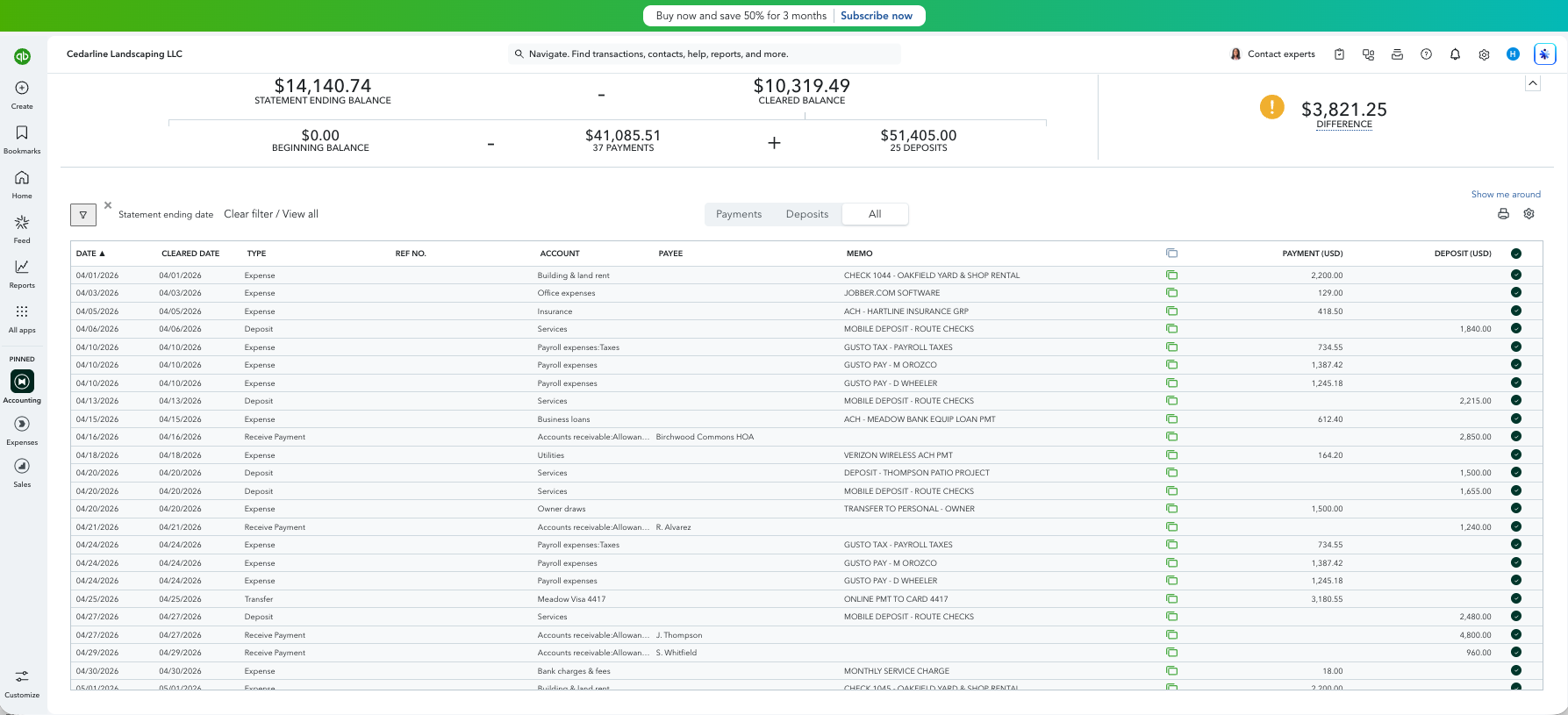
Our checking feed simply stops for two weeks in June — ten transactions missing, including a payroll run and two invoice payments. This trap produced the sharpest philosophical difference of the whole test.
QuickBooks’ reconciliation noticed something was wrong — a stubborn $3,821.25 difference — but offered zero help finding it. No “your transactions jump from June 5 to June 22,” just a number and a scroll bar:
Xero didn’t notice anything at all. Because a manually-imported feed is its only source of truth, the gapped quarter showed green, balanced, fully reconciled — the missing $3,821.25 invisible by design:
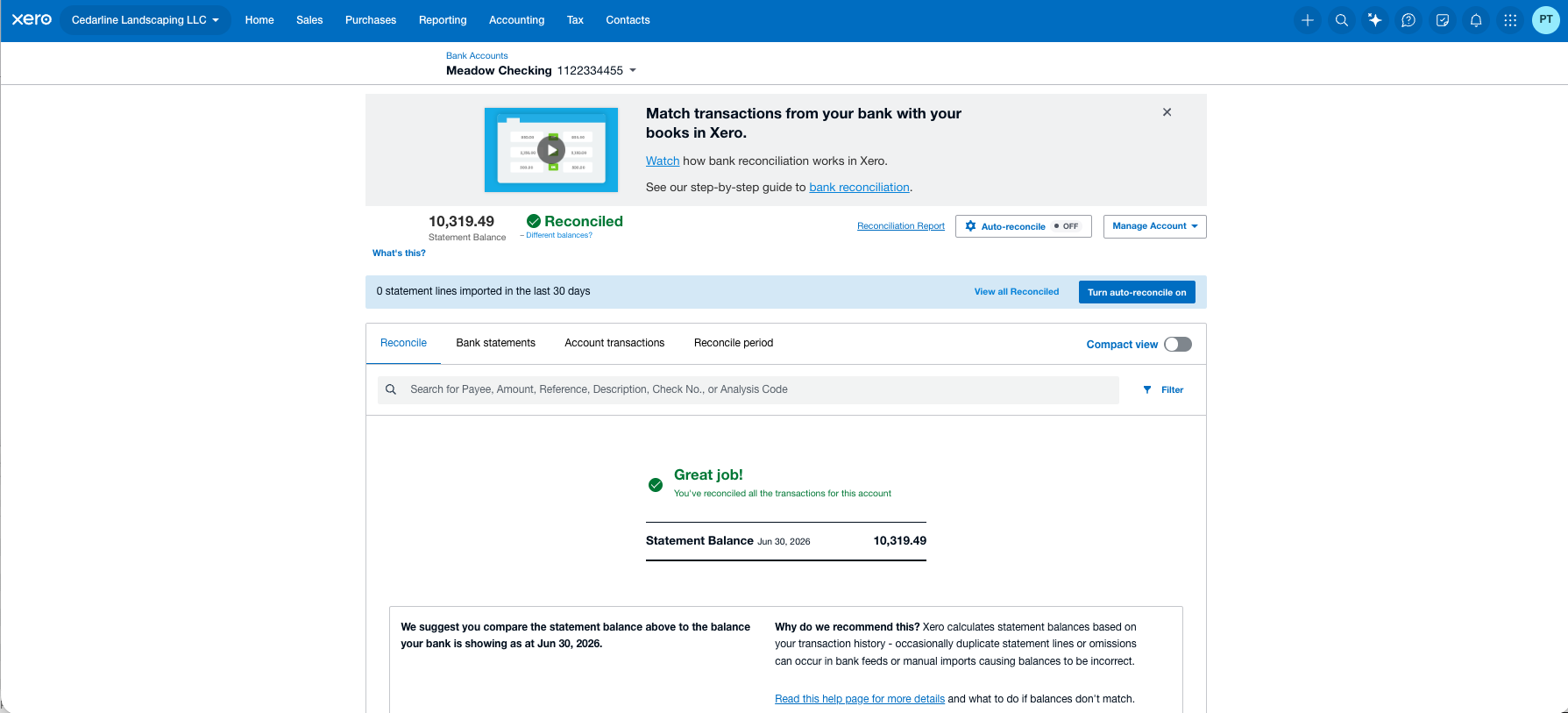
Repairing the gap reversed the ranking: in Xero the backfill statement imported, matched both invoice payments instantly, pre-filled everything else from precedent, and re-reconciled in about five minutes. QuickBooks took twenty. Detection: QuickBooks, on points. Repair: Xero, decisively. Moral: neither tool will tell you your feed has a hole — month-end discipline will.
Everyday work: two philosophies of “smart”
This is where the tools genuinely diverge. QuickBooks guesses from day one — and on a fresh company file its guesses were dice rolls. Identical payroll-service debits drew “Payroll expenses,” “Legal & professional services,” and a blank across five occurrences; payroll taxes — with the words PAYROLL TAXES in the description — were twice guessed as “Insurance”:
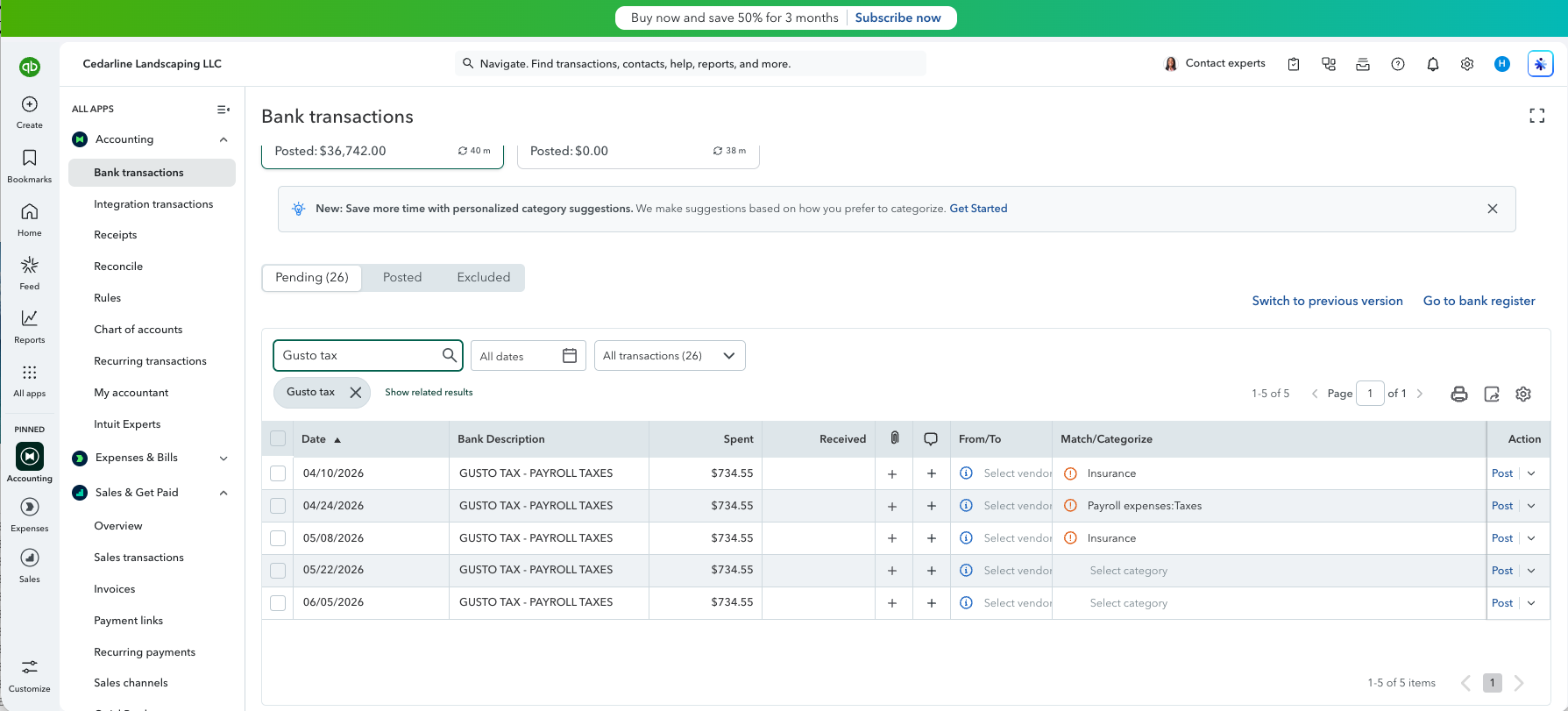
We counted roughly fifteen wrong suggestions across the quarter. The redemption: QuickBooks learns. After a hundred-plus corrections, its suggestions for the backfill batch came back nearly perfect. Buried in a review tab, we even found it privately scoring its own confidence — “Need 2 similar past transactions — 0 found” — honesty it never surfaces where you’re actually working.
Xero guesses nothing cold. Your first pass is entirely manual — the cost of its philosophy — but code one route deposit and every subsequent one arrives pre-filled; it learned each pattern from a single example, including bank transfers, and fabricated nothing in three months of books. Zero wrong guesses, because it only ever repeats your answers. (Which means it will repeat your mistakes too. Nothing checks the teacher.)
Bank rules follow the same split. QuickBooks’ rule auto-posted all seven matching transactions the instant we saved it — breathtaking efficiency, and a wrong rule would corrupt the books silently forever. Xero’s rule suggests, names itself on every line it wants to touch, and waits for a click each time:
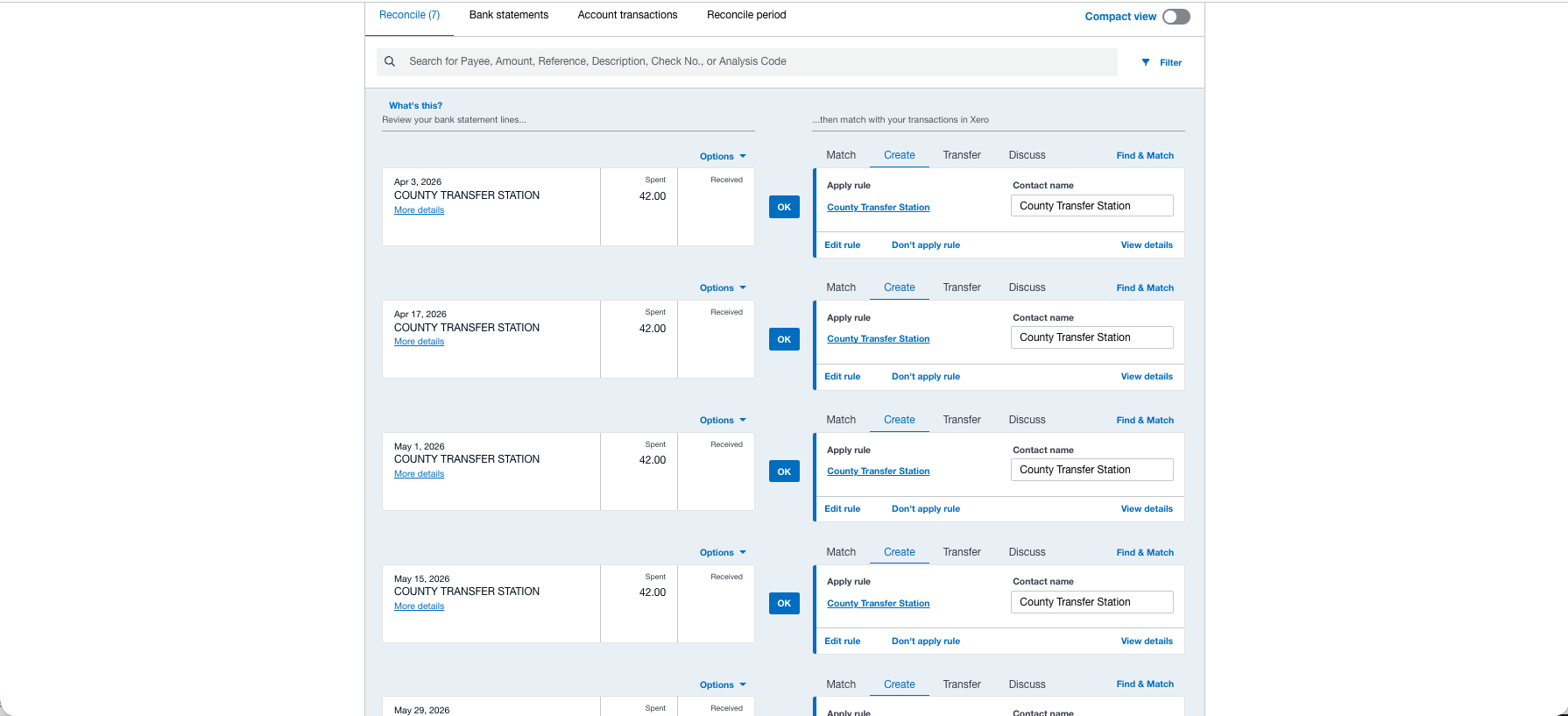
Pick your poison: automation you must audit, or safety you must click through.
And recording a simple credit-card payment — money moving between your own two accounts — took three clicks in Xero’s Transfer tab, and twenty minutes in QuickBooks, where a hidden default policy (“transactions over $2,500 require review”) held the transfers hostage behind a misleading error message until we excavated the setting and hard-refreshed the page.
The books at the end
Here is the result that validates both tools and our method at once: after all of the above, both tools produced the same quarter to the penny. Income $67,060.00, net income $24,390.17 — identical, in both, matching our master dataset exactly.
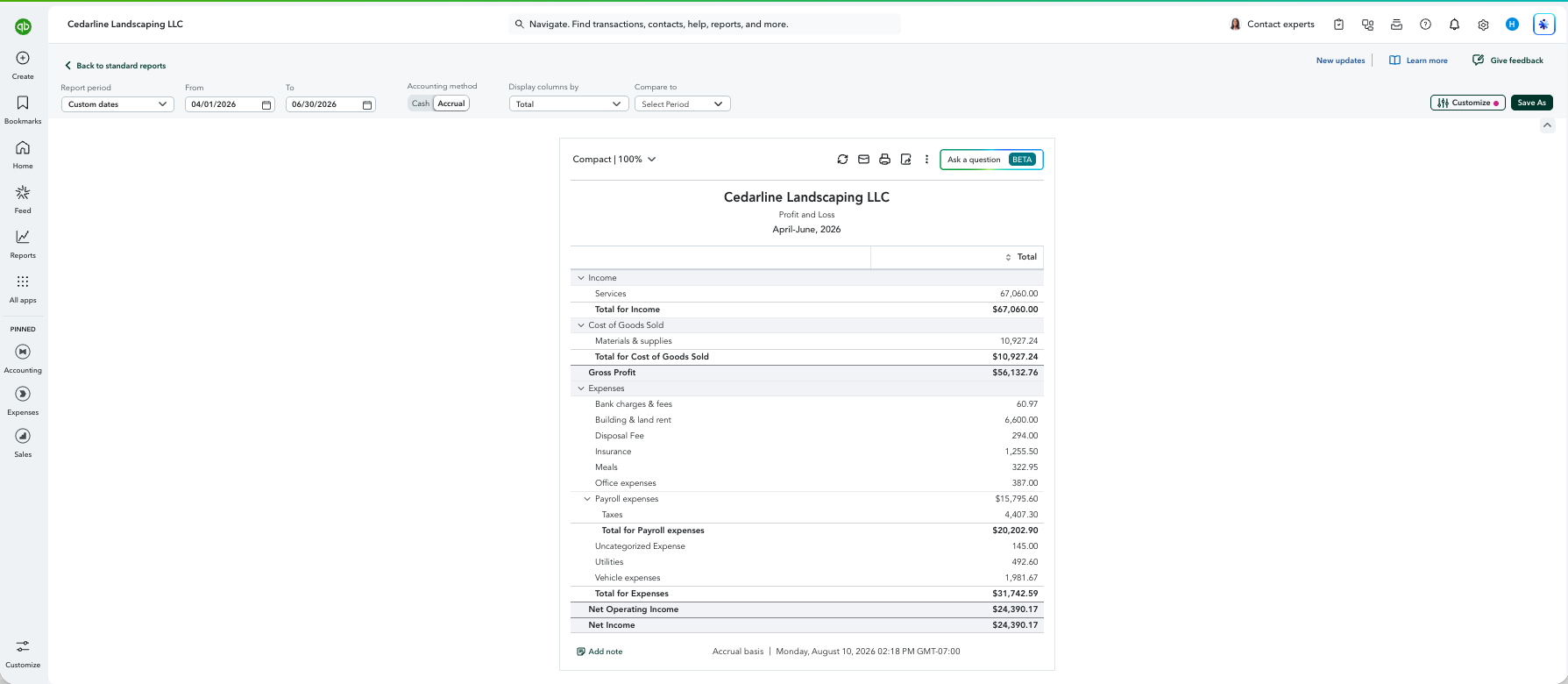
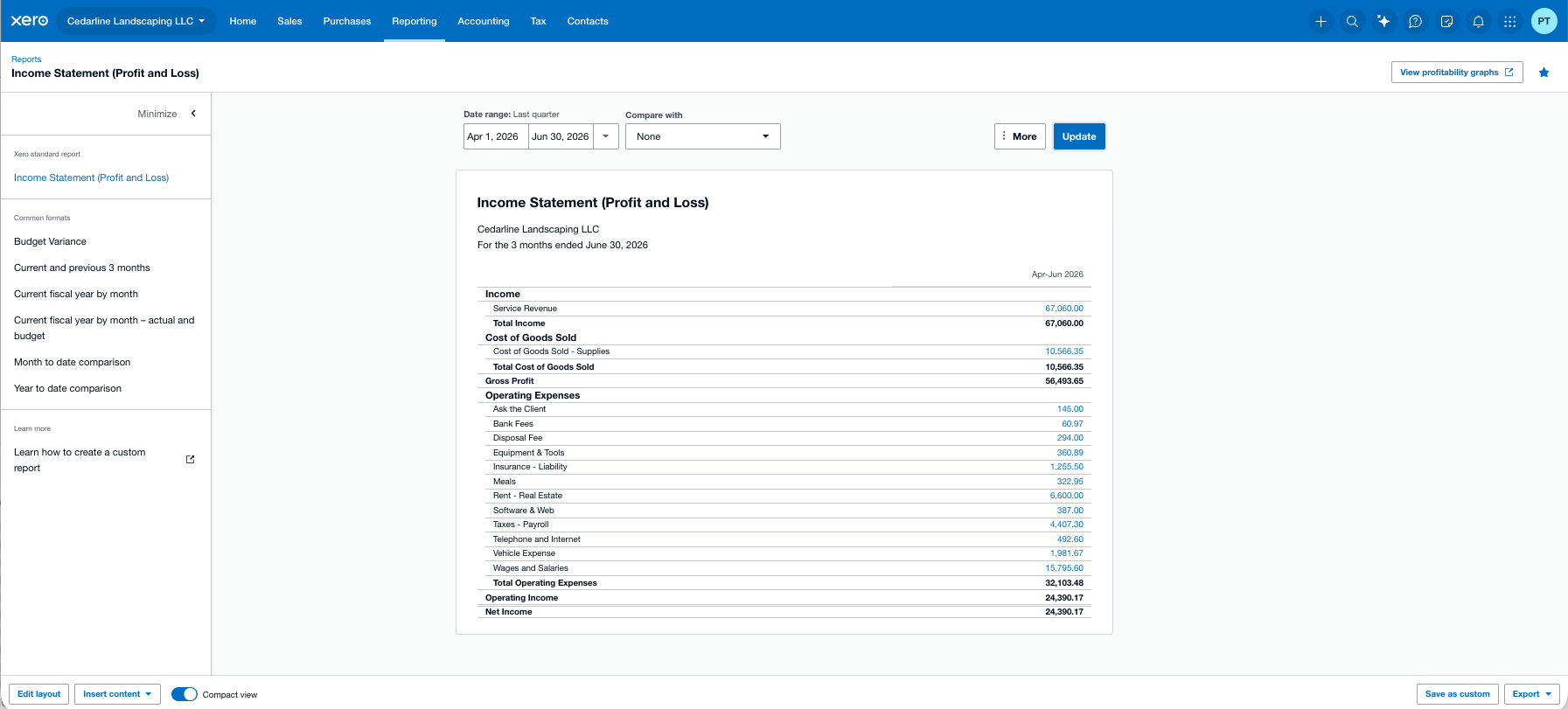
Xero’s balance sheet came out cleaner — receivables in plain Accounts Receivable, where QuickBooks routed ours through an “Allowance for doubtful accounts” subaccount that any reviewing accountant would flag. Both A/R aging reports caught exactly the three unpaid invoices we left outstanding.
The seat math for a practice
For a solo bookkeeper the multi-client arithmetic may decide this on its own. Xero: unlimited users, free, on every plan — you’re just added to each client’s file as a user. QuickBooks Essentials caps at three users (a number displayed nowhere in the product — we hunted), with accountant access handled through separate free firm seats that grant your entire firm admin rights via QuickBooks Online Accountant. QuickBooks’ role list is more accounting-shaped (AR manager, in-house accountant); Xero’s is more function-shaped. But free-and-unlimited versus capped-and-invisible is not a close call.
What practitioners say
We test; practitioners live in these tools daily. One working bookkeeper’s account, from an r/Bookkeeping thread in early 2026, captures a dynamic no lab test can: what the price gap does to real client relationships.
“Have been running a bookkeeping business over 15 years. I do have clients in both, but am in process of switching 4 clients to Xero today,” wrote u/Significant_Maybe560. Among their reasons: one client with a heavy paperwork load — “Hubdoc is included” — and pricing: “clients have been complaining about the price hike of Intuit, even associating indirectly the cost of bookkeeping with the price hike. So I am switching them over to at almost a half a price.”
Two things in that are worth underlining. The pricing pain is sharper than a comparison table shows — clients conflate the software’s price hikes with their bookkeeper’s bill, which makes the platform choice a client-relationship decision, not just a cost one. And the Hubdoc point is factual: Xero bundles Hubdoc (receipt and document capture) with its business plans — a tool that costs extra elsewhere, and one that has since been through our test dataset: our Dext vs Hubdoc comparison scored it 24/32, with the free-with-Xero bundling as exactly the trump card this practitioner describes.
Update, August 2026. Six days after this review’s last verification, Xero launched embedded US payroll, powered by Gusto (announced August 12): payroll inside Xero, flowing natively to the ledger. It doesn’t change this review’s scores — payroll wasn’t scored — but it strengthens the platform-choice calculus for practices with payroll-running clients, and it makes the Hubdoc-bundling pattern above look less like a perk and more like a strategy. We’ll test it once it has a quarter of seasoning.
Verdicts
Both trials were free; neither vendor knew a review was underway. We have no relationship with either company beyond the affiliate links disclosed above, and the books we ran are downloadable if you’d like to check our work.
Filed under: quickbooks · xero · comparison · bookkeeping software