Decision guide · Bookkeeping
When to move a client off Wave
Free Wave beat QuickBooks on our 32-point test and produced the identical quarter to the penny. We ran our standard messy books through it to find the real boundary — and Wave drew it for us, on the very last screen: the free tier ends the moment a bookkeeper touches the books.
Some links below are affiliate links — if you subscribe through one, we earn a commission at no extra cost to you. It never changes a verdict; every tool runs the same test books. Full disclosure
Here is the result nobody at the paid vendors wants framed this way: we ran our standard quarter of deliberately messy books through Wave’s free tier, and it scored 22 out of 32 on the same checklist where QuickBooks Online — at $85 a month — scored 21. The profit and loss came out identical to the penny: the same $24,390.17 net income that QuickBooks and Xero produced from the same files. Free Wave is not a toy. It is real double-entry bookkeeping with a real chart of accounts, real equity handling, and the best refund workflow we’ve tested at any price.
And yet the question in the title has a precise answer, and Wave itself handed it to us on the last screen of the trial: the free tier ends the moment a bookkeeper touches the books. Not gradually, not “as the client grows” — structurally, at a paywall labeled with your job title. This review covers what free Wave genuinely does well (more than the folklore admits), where it bit us (harder than the folklore warns), and the exact signals that mean it’s time to move a client out.
How we tested
Same method as every review on this site: a fictional three-person landscaping company, one quarter, 162 bank and card transactions imported from CSV, 18 invoices, and five planted traps — a duplicated charge, a refunded customer deposit, an uncategorizable vendor, a foreign-currency purchase, and a two-week hole in the bank feed. Signup to reconciled books with reports took about two hours, right in the pack with the paid tools — QuickBooks took ~2h10m, Xero ~1h52m. No credit card was demanded at any point, and there is nothing to cancel, ever.
The scoreboard
| Wave (free) | QuickBooks $85/mo | Xero $55/mo | FreshBooks $43/mo | |
|---|---|---|---|---|
| Import & setup (8) | 6 | 6 | 7 | 5 |
| The five traps (10) | 7 | 4 | 4 | 5 |
| Everyday work (8) | 5 | 6 | 8 | 4 |
| Reports & access (6) | 4 | 5 | 6 | 4 |
| Total (32) | 22 | 21 | 25 | 18 |
Xero keeps the crown. But second place going to the $0 product — ahead of QuickBooks on these books — is the honest headline, and it’s built on some genuinely surprising engineering choices in the free tier.
What free actually buys (more than you’d think)
A real chart of accounts. Forty-six defaults including a proper Owner Investment / Drawings equity account — our owner’s draws landed in equity where they belong, off the P&L, with two clicks. FreshBooks, at $43/month, books the same draws as an expense called “Personal.” Wave’s chart also offers real account types for loans and fixed assets: our equipment loan tracked as a liability with payments transferring against it, and the $2,899 mower capitalized to a Machinery & Equipment asset we created in seconds.
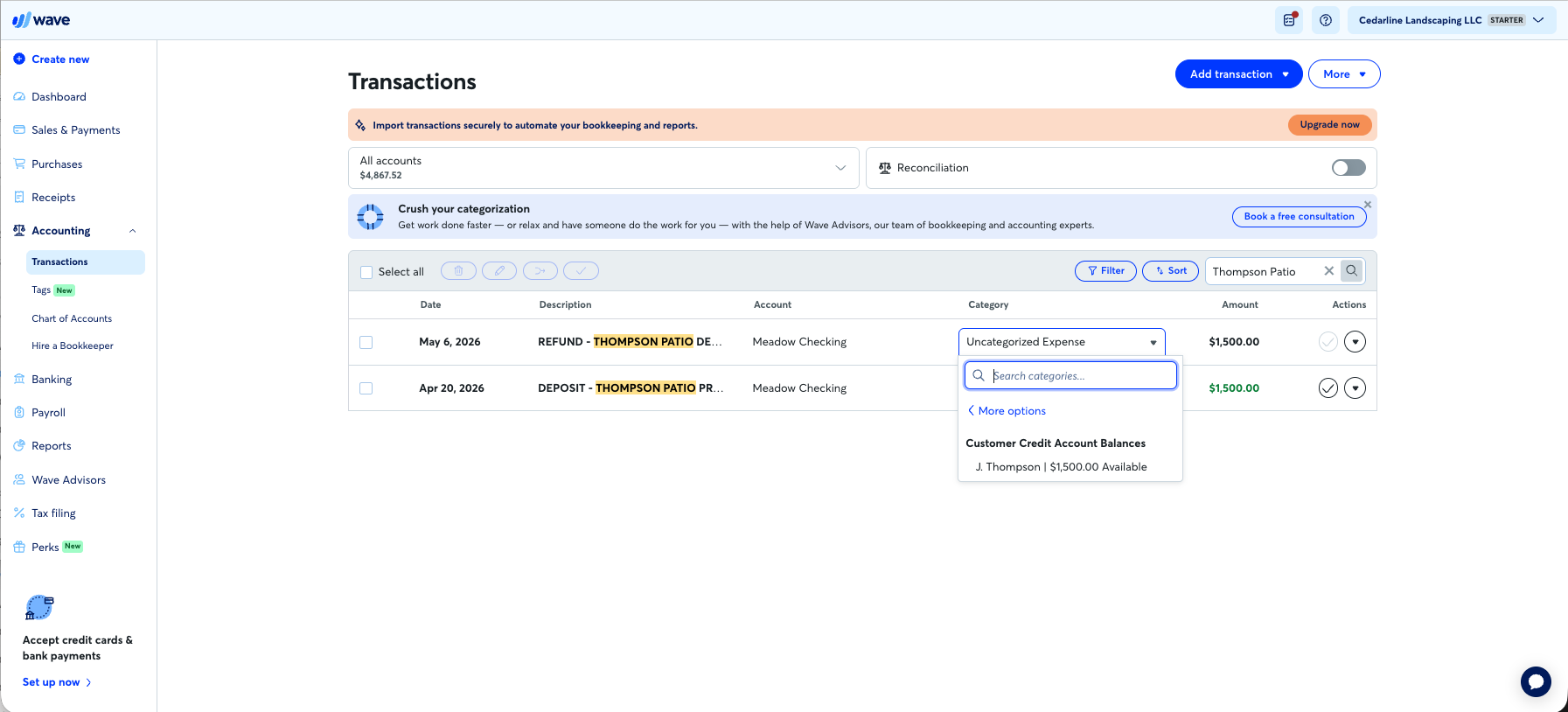
The best refund handling we have tested, at any price. Our trap: a customer put down $1,500 on a patio job in April; the job died and the money went back in May. QuickBooks suggested booking the refund as “Taxes & licenses” — phantom income plus a phantom tax deduction, two clicks from reality. Wave has named categories for the entire cycle: the deposit books as “Customer Prepayment, Deposit, or Payment on Account” tied to the customer, and the refund’s picker offers “Return of Customer Credit” — with the tracked balance sitting right there:
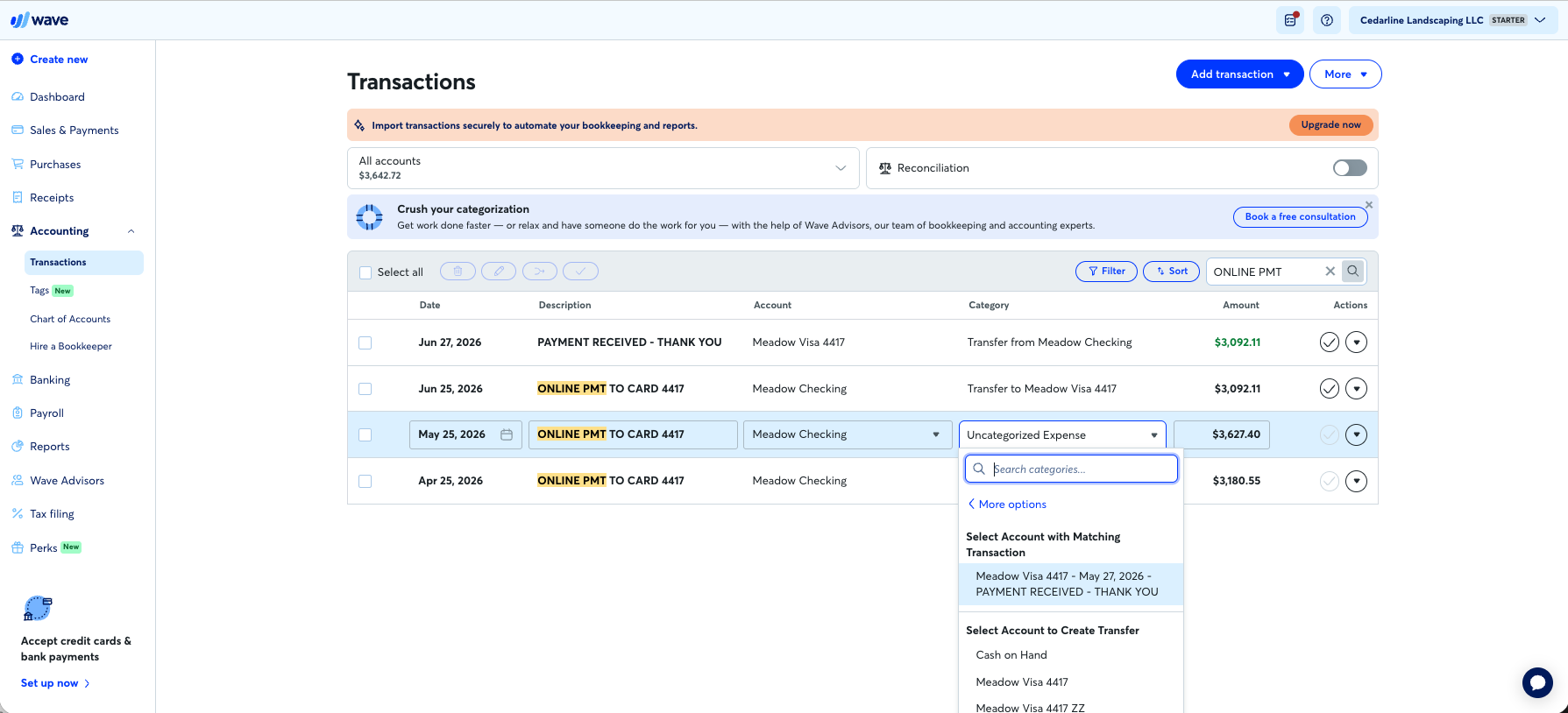
Transfer intelligence. Categorize a card payment as a transfer and Wave finds the matching transaction on the other account — across a two-day settlement lag — and resolves both sides in one click:
Honest reconciliation. Wave’s statement-based reconciliation refused to balance our gapped checking account and locked the “End reconciliation” button until the missing $3,821.25 was found — where Xero showed the same gapped quarter as green and fully reconciled. Detection without diagnosis (more below), but detection beats a green lie.
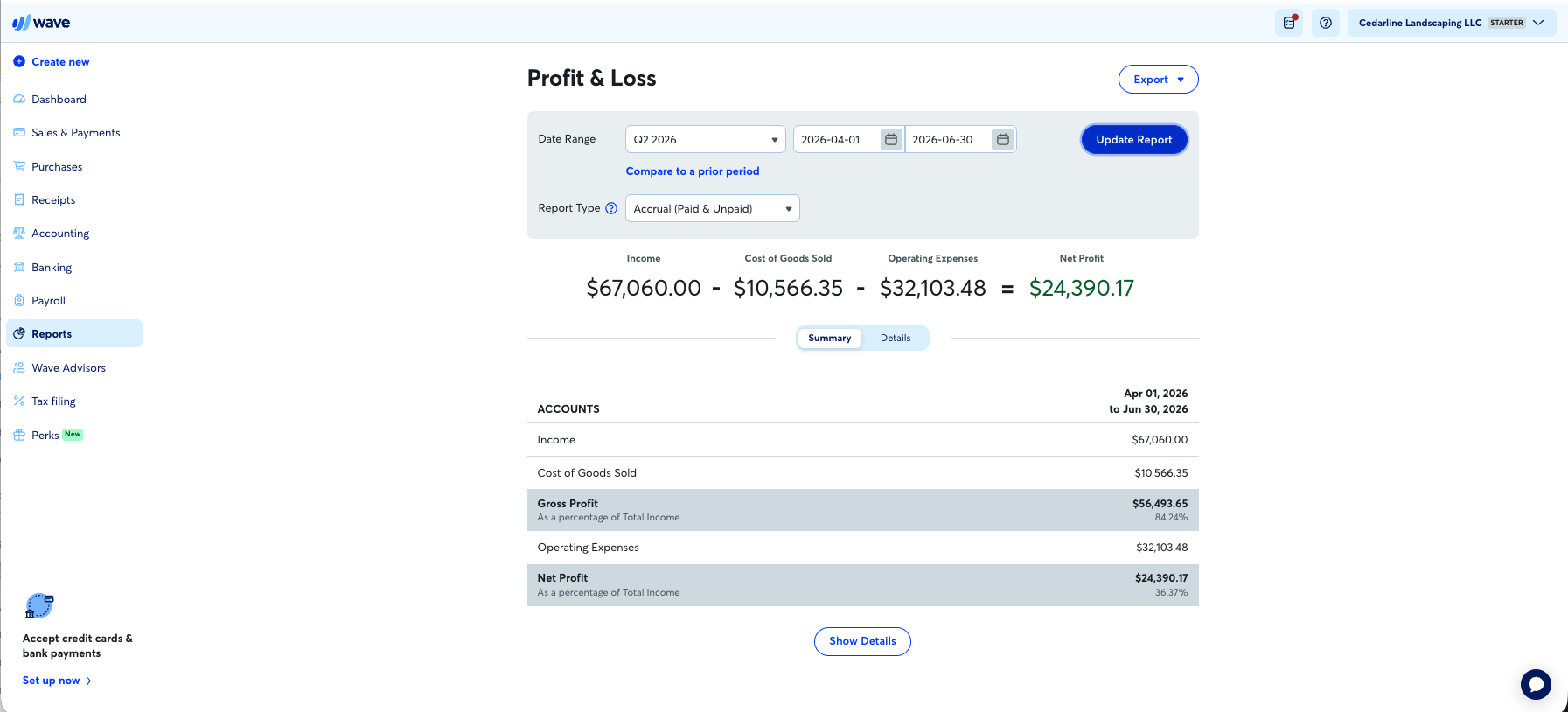
Reports a client can read. Accrual/cash toggle, quarter presets, margin percentages — and the numbers were exactly right: income $67,060.00, net $24,390.17, receivables aging catching precisely the three invoices we left unpaid.
What free-tier bookkeeping actually feels like
Now the other side of the $0. On Starter, nothing is automatic. No bank feeds — transactions arrive by CSV upload or by hand. No categorization suggestions, no bank rules, no memory: the tool that pre-fills nothing in April also pre-fills nothing in June, so every month is the same manual sweep. Wave is refreshingly plain about where the line sits — the upgrade ad renders exactly where the automation would be:
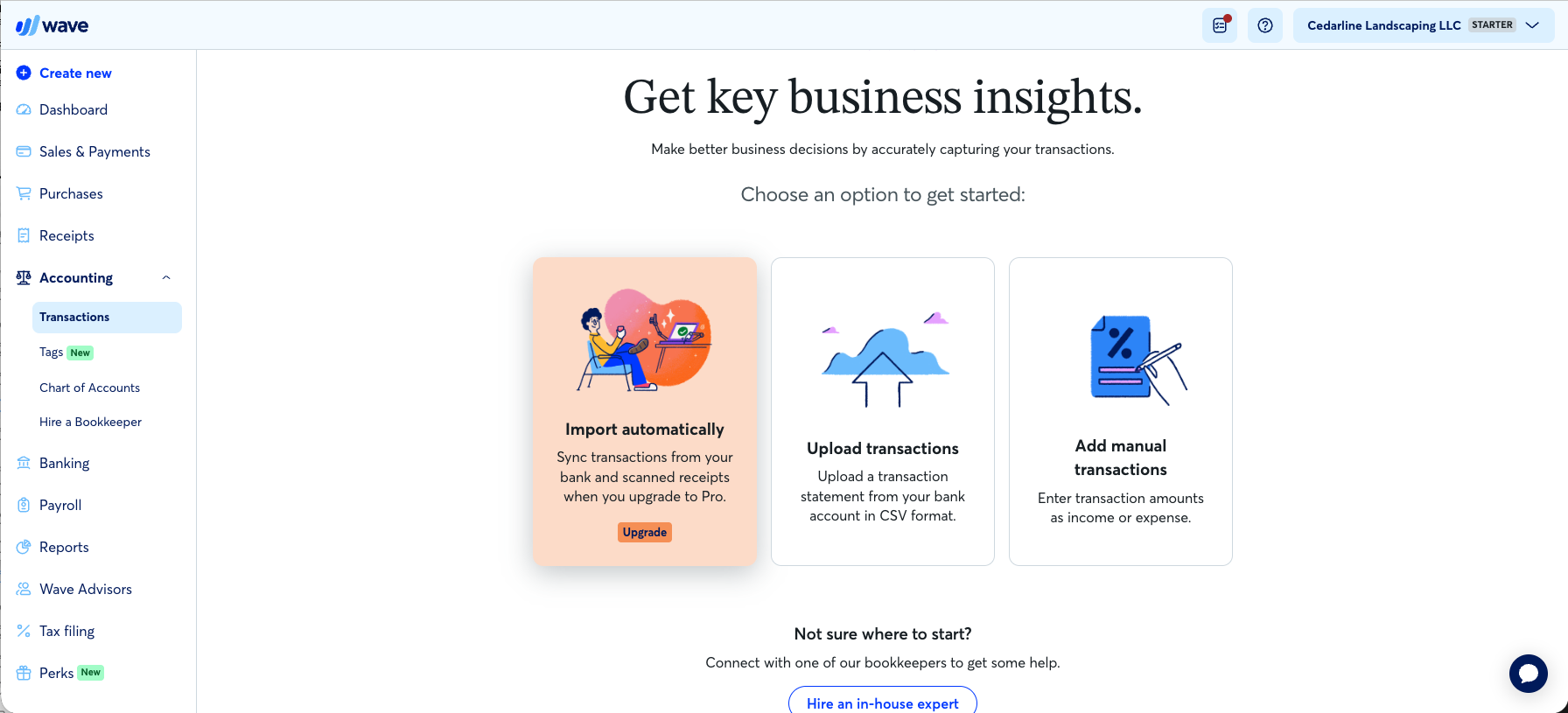
The hand tools are good — search a vendor, select all, set the category and mark reviewed in one bulk action:
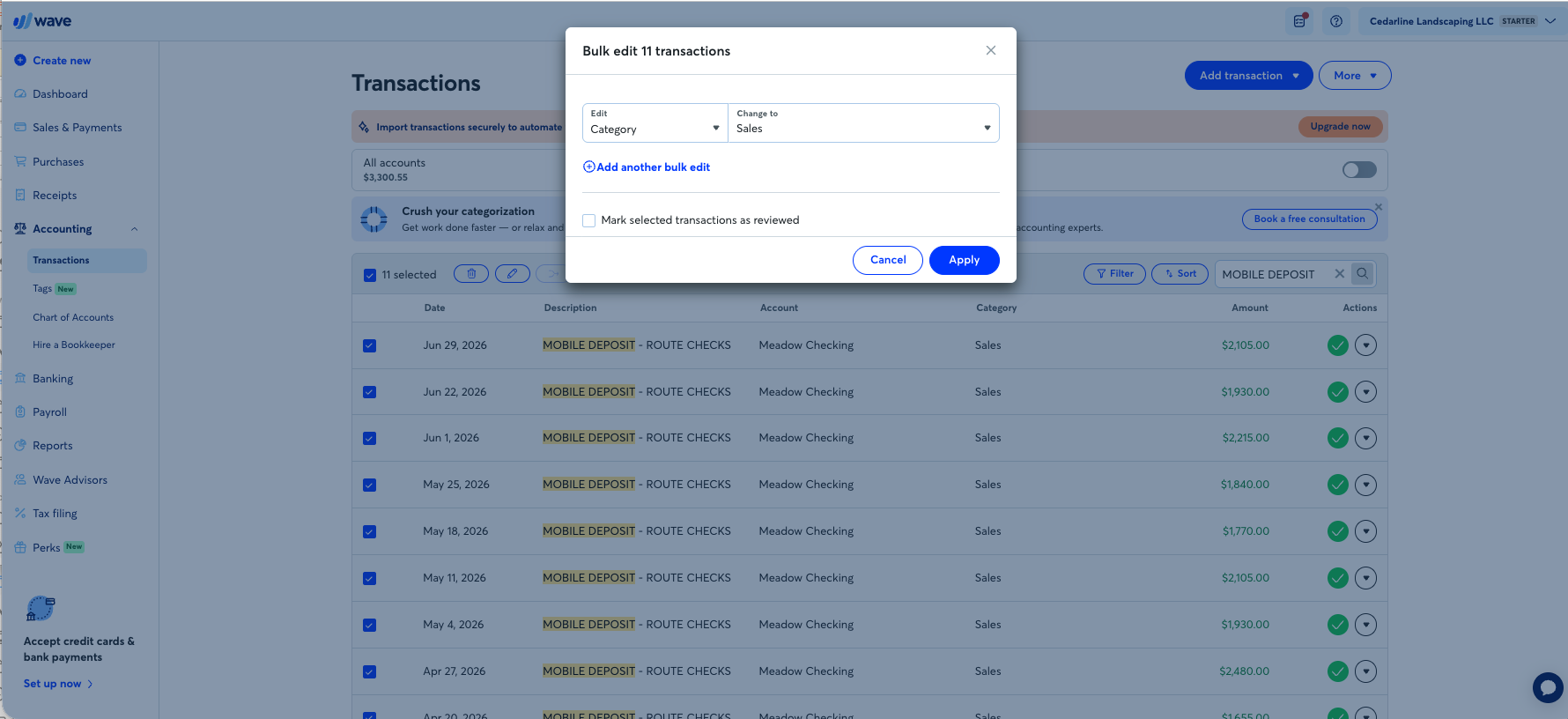
We categorized the full quarter — 162 lines — in about seventy minutes including all five traps and both reconciliations. That’s tolerable once. As a monthly routine it’s the free tier’s real price: the client isn’t paying $19, they’re paying in your hours, every month, forever. That arithmetic alone eventually answers this article’s title for any client with real volume.
Where it bit us
Three sharp edges, in ascending order of how much they’d hurt a client running unsupervised.
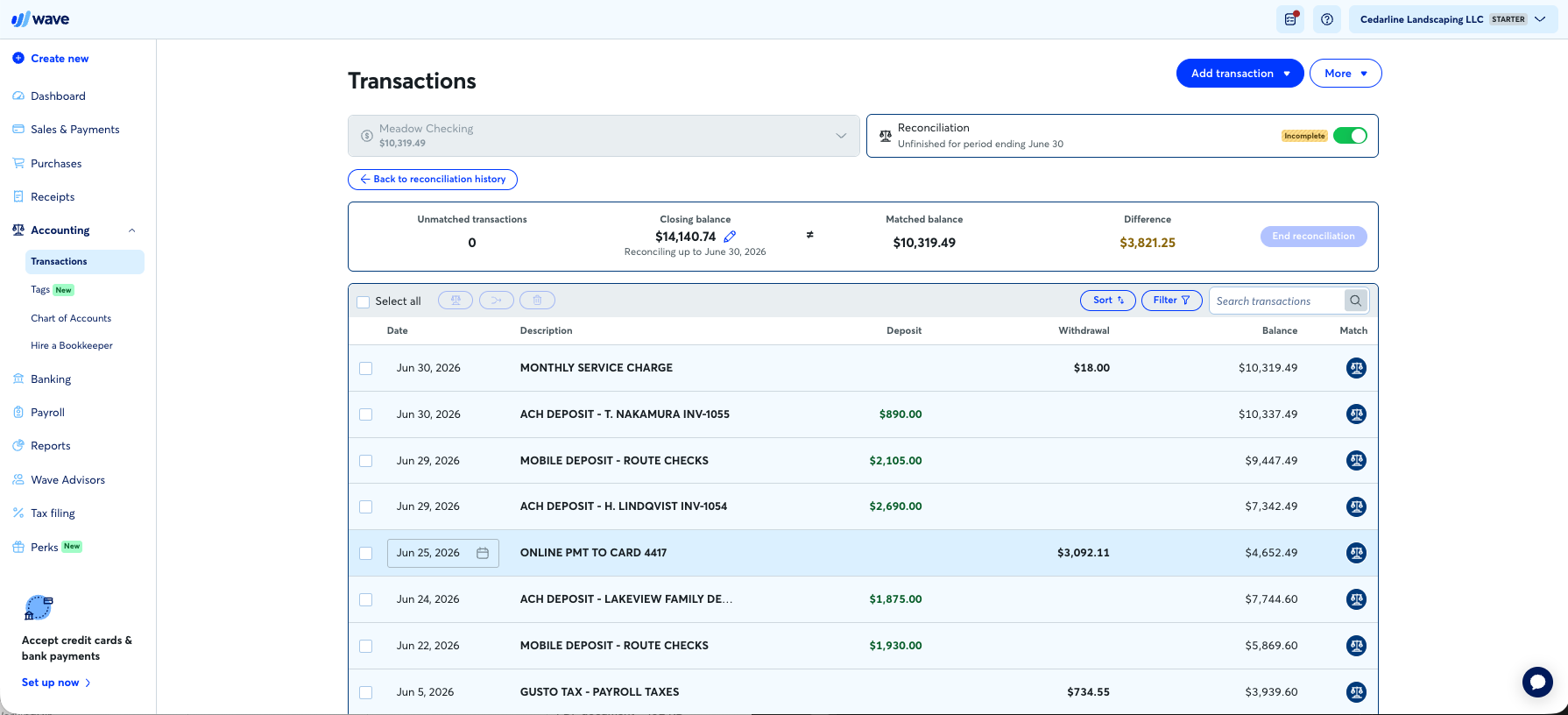
The reconciliation can’t say where. When checking wouldn’t balance, Wave showed the difference — $3,821.25, orange, unblinking — and nothing else. Our missing two weeks were visible on that very screen as a date column jumping from June 5 to June 22; no part of the product points at the hole. Same blindness as QuickBooks, less excuse at the price, and the bulk-match button threw an error popup twice for good measure:
The duplicate went through, again. Our twin $342.17 charges, posted same-day by the bank, sat side by side unflagged — the same 0-for-2 as QuickBooks and Xero. (A duplicate warning does exist at the statement-upload layer, so the concept lives somewhere in the product — just not where the money is.) The human is still the duplicate detection:
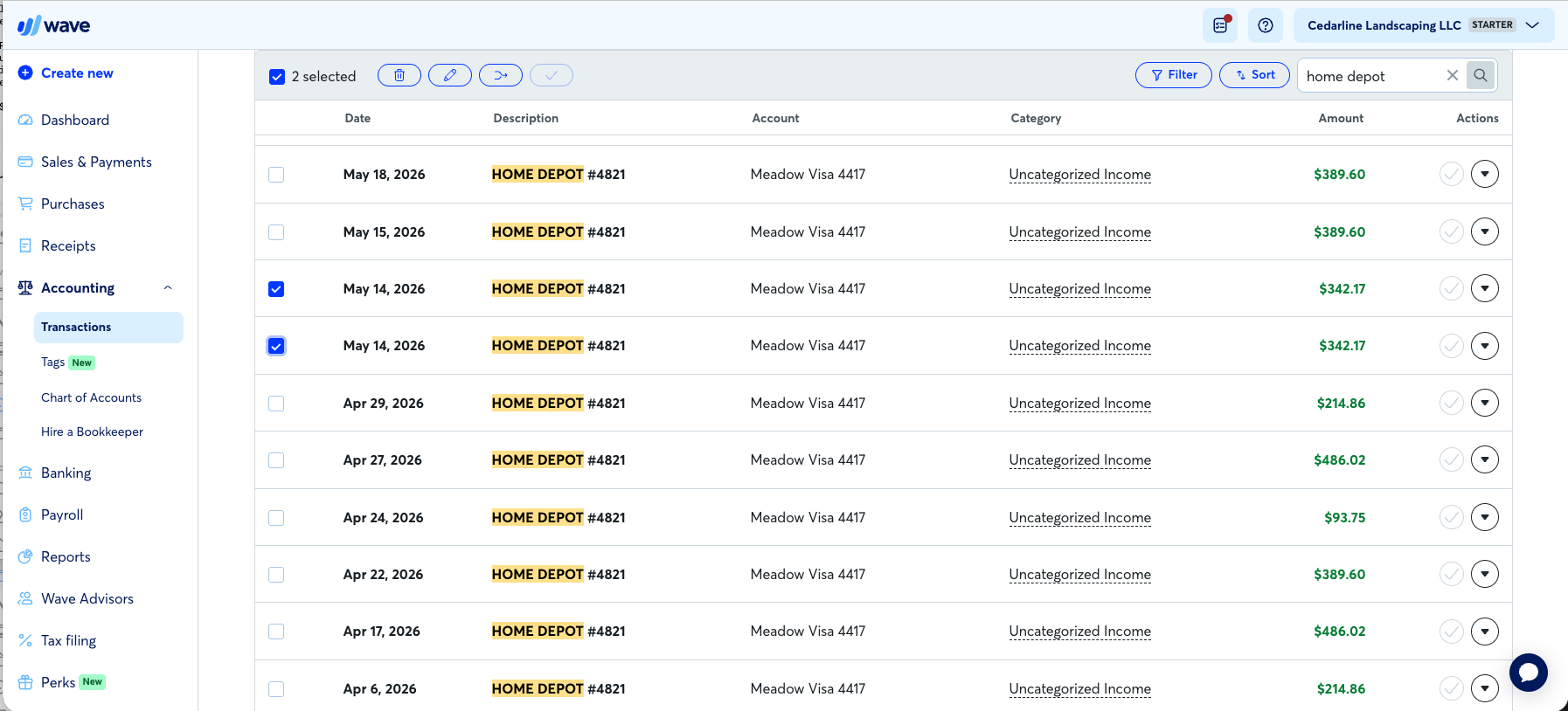
The card-import trap. Look at the colors in that screenshot: every card charge is green. Wave’s sign convention silently inverts for credit-card uploads — our entire card file imported as income, no question asked, no warning shown. The fix was worse than the bug: we deleted all 90 transactions and re-uploaded a corrected file, and Wave’s statement memory silently imported zero rows — it remembers uploads even after you delete their transactions, offers no history and no override. The only way out was abandoning the account and building a new one. We’re a testing lab and it cost us fifteen minutes; a DIY client would either double their income or give up. If a Wave file arrives in your practice with a credit card in it, audit the card’s signs first.
The answer to the title
All of that is context. Here is the screen that decides the question:
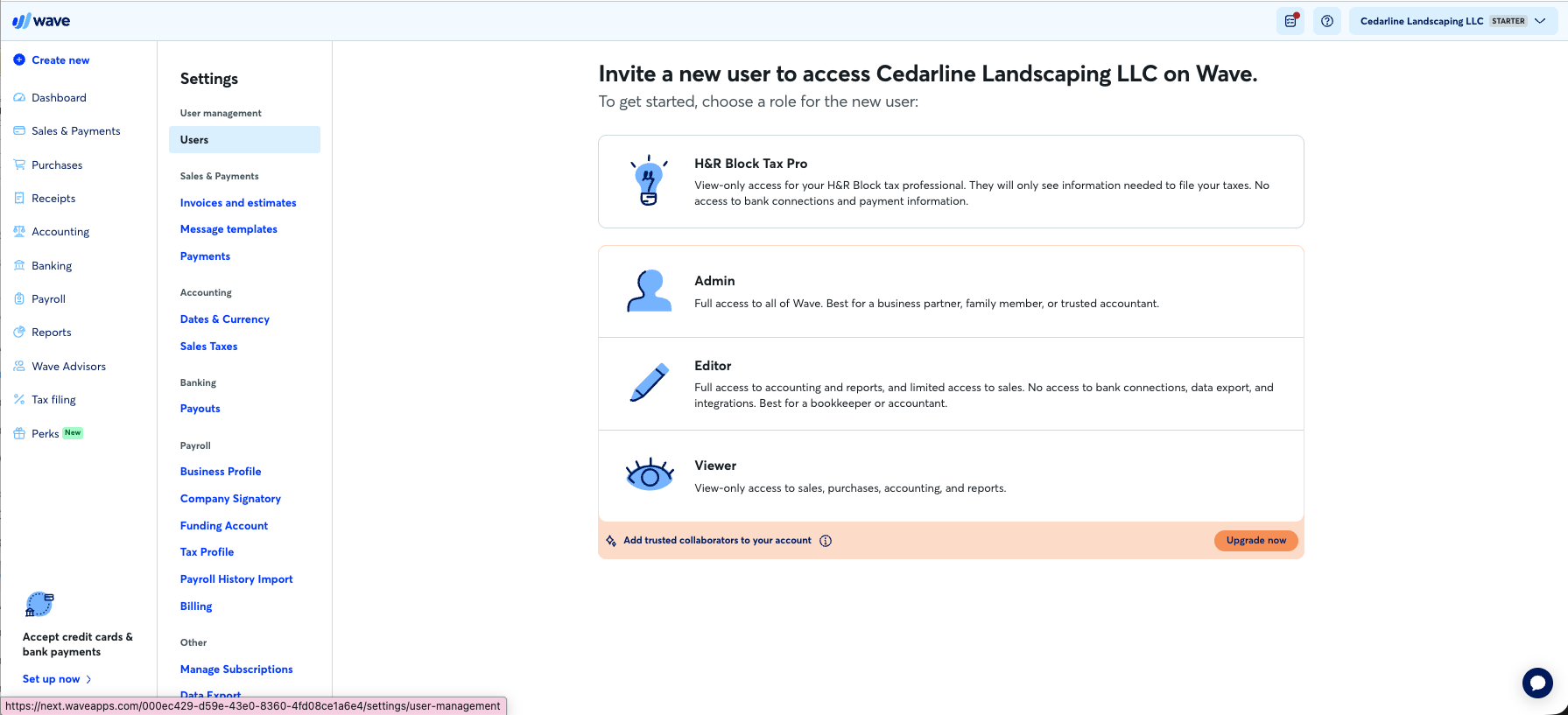
Wave’s invite screen offers an Editor role, captioned — their words — “best for a bookkeeper or accountant.” Below it sits the paywall: adding any collaborator requires Pro, $19 a month. On free Wave, a client cannot give their bookkeeper access to the books. At all. The only free invitation is a view-only seat for an H&R Block tax preparer. Your choices are the client’s own login credentials — which no professional should ever accept for a system holding their bank connections — or the client upgrades, at which point “free” is over and Xero’s $25 entry tier is six dollars away.
This isn’t an oversight; it’s the business model, and it’s coherent. Wave monetizes payments (2.9% + $0.60 a transaction on free; the $0.60 waived on Pro) and sells Pro to exactly the businesses that need feeds, automation, and collaborators. (Wave’s and every other tool’s current prices live on the pricing tracker, dated.) The free tier is engineered — well — for one person doing their own books alone. The moment there are two people in the books, one of them professional, the tier has done its job and ends.
A CPA firm’s version of the same conclusion, from SDO CPA’s 2026 software comparison, matches our lab result from the practice side: “Wave’s accountant access is more limited than QuickBooks or Xero. This can create friction with your CPA.” And their advice on when switching is worth it: “If your accountant can’t easily work with your data, you’re paying for workarounds every year.”
The move signals, precisely
From our trial, in the order they’ll actually appear:
- A bookkeeper enters the picture. The access paywall makes this structural, day one, not a matter of taste. If they’re paying $19 to let you in, run the real comparison against a real ledger’s entry tier — the price gap no longer protects Wave.
- The monthly sweep starts costing real hours. No rules and no suggestions means categorization labor grows linearly with volume, forever. Our 162-line quarter took ~70 hand-worked minutes; triple the volume and it’s a billable afternoon, monthly, that automation elsewhere would erase.
- A credit card joins the books. The sign-inversion trap plus the no-recovery re-import means card-heavy clients on Wave are one upload away from books that overstate income — audit any inherited Wave file for exactly this.
- Anything the tier simply lacks becomes load-bearing: bank feeds, receipt capture, inventory, multi-currency. (Capture especially — our Dext vs Hubdoc test has no free path into Wave; receipts are a Pro feature too.)
And when to leave them there: a solo owner doing their own books, modest transaction count, invoice-first income, no bookkeeper in the loop, cards handled carefully. For that client Wave is not a compromise — on our books it out-scored QuickBooks, kept every penny straight, and handled a refund better than tools costing $1,000 a year. Moving that client would be billing them for your preference.
Where they land when they move
Our test results make the destinations unusually clean: Xero (25/32) is the default — cheapest real ledger, unlimited free users (the exact thing Wave paywalls), and it inherits a Wave client’s DIY spirit with suggestions that only learn from you. FreshBooks (18/32) fits the invoice-first freelancer who’ll never have a balance sheet — knowingly, with its boundaries respected. QuickBooks (21/32) earns the move only when the client’s accountant, industry, or history demands it. Migrate at a month boundary, bring the trial balance and open invoices, and expect the cleanup to be its own small project — especially if a credit card was involved.
Verdicts
Wave never asked us for a card and there is nothing to cancel; neither vendor knew a review was underway. Affiliate links, where present, are disclosed and never touch a verdict. The books behind every number here are downloadable — run them through Wave yourself and check our work.
Filed under: wave · free accounting software · client migration · bookkeeping software